Scan Types#
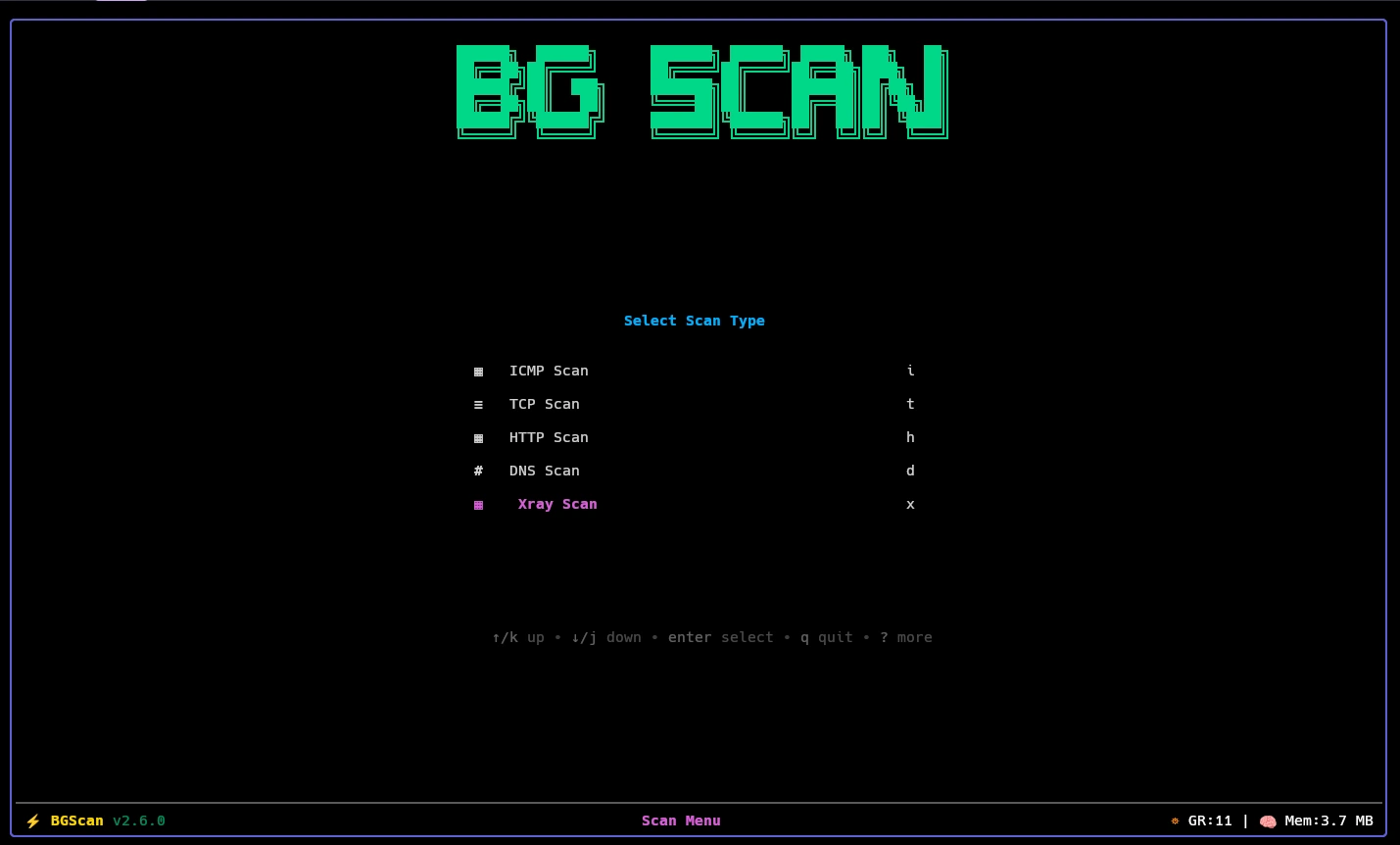
The scan type menu offers six entries, each bound to a key:
| Key | Scan Type | What it does | Configuration File |
|---|---|---|---|
i | ICMP Scan | Sends echo requests and measures round-trip time | icmp_settings.toml |
t | TCP Scan | Opens a connection to one port and measures handshake latency | tcp_settings.toml |
h | HTTP Scan | Sends one HTTP request and records status, version, and TLS | http_settings.toml |
x | Xray Scan | Routes traffic through an Xray outbound and measures it | xray_settings.toml |
r | DNS Resolve | Queries each target as a resolver, tests for DPI hijacking | dns_settings.toml |
d | DNS Tunneling | Tests whether resolvers can carry a DNS tunnel | dns_settings.toml |
DNS Resolve runs a standalone resolver scan. It tests each target IP as a DNS resolver and optionally checks for DPI hijacking.
DNS Tunneling opens a config browser first. You select a saved tunnel configuration (DNSTT, VayDNS, Slipstream, MasterDNS, StormDNS, or TheFeed) before the scan starts. The tunnel stage optionally chains a resolver pre-scan when check_dns_resolver is enabled in the DNS tunneling settings.
Xray Scan first asks which outbound template to use. If pre_scan_type is icmp, tcp, or http, that stage runs ahead of the Xray stage and filters the targets. With none, Xray runs directly.
ICMP#
Echo request and reply. The probe shares one IPv4 socket and, when the system allows, one IPv6 socket across all workers, matching replies back to the worker that sent them.
It records latency, the number of attempts, and whether the socket was raw or unprivileged UDP. Cheapest way to narrow a large range before a heavier scan.
TCP#
A full connect scan, not a SYN scan. It completes the handshake to the configured port and records the latency of the first successful attempt. Timeouts are retried up to tries, while a refused connection fails immediately so dead ranges drain quickly.
Records latency, port, and attempt count.
HTTP#
One request per target over HTTP/1.1, HTTP/2, or HTTP/3. Version selection happens over ALPN for h1,h2; h3 uses a separate QUIC probe. Responses outside accepted_status_codes are discarded, and an empty list accepts everything.
Records latency, status code, negotiated version, and whether TLS was used.
Xray#
Starts an in-process Xray instance per target using the selected outbound template, then measures latency through the local proxy. Depending on connectivity_test_type, it also runs a download test, an upload test, or both, and fails the target when the measured speed falls below the configured minimum.
Records latency plus download and upload throughput. Both speeds are zero when only connectivity is tested.
DNS Resolve#
Each target IP is treated as a resolver. With check_dpi enabled, the probe first asks for a random .invalid name. A resolver that claims success for a name that cannot exist is fabricating answers and gets dropped. Surviving targets are then queried for the configured record types until one returns an accepted response code.
Records latency, the record type that worked, attempt count, response code, and whether the DPI check ran.
DNS Tunneling#
Tests whether resolvers can carry a DNS tunnel. You first select a saved tunnel configuration from the config browser. All six protocols can be scanned:
- DNSTT — DNS tunnel using the vaydns library with legacy DNSTT-compatible framing
- VayDNS — Native vaydns protocol with tunable QNAME, MTU, and record type settings
- Slipstream — External binary (
slipstream-client) based tunnel - TheFeed — Encrypted feed tunnel over UDP, TCP, or DNS-over-TLS with single or double query encoding
- MasterDNS — In-process tunnel with configurable encryption and MTU discovery
- StormDNS — In-process tunnel with configurable encryption, MTU discovery, and query type selection
DNSTT, VayDNS, and Slipstream probes each allocate a local SOCKS5 port per target, so they are much slower than the resolver stage. Latency measures the tunnel once it is up, not the time to bring it up.
When check_dns_resolver is enabled in the DNS tunneling settings, a resolver pre-scan runs first and feeds surviving targets into the tunnel stage. When adaptive_resolver is enabled, the resolver settings are automatically adjusted to match the tunnel configuration’s transport, port, and domain.
See DNS Tunneling for detailed configuration of each protocol.